Advanced Strategies for Competitive Advantage
Gaining competitive advantage requires sophisticated approaches that go beyond basic implementation. These advanced strategies leverage deeper insights and innovative thinking.
Competitive Intelligence
Understand your competitive landscape thoroughly:
- Analyze competitor strategies and positioning
- Identify market gaps and opportunities
- Monitor competitor activities and responses
- Develop unique value propositions
Innovation Frameworks
Foster continuous innovation:
- Experiment with new channels and approaches
- Test emerging technologies early
- Build internal innovation capabilities
- Create feedback loops for continuous improvement
Companies that systematically innovate see 55% higher revenue growth than competitors.
Building for Long-Term Success
Sustainable success requires building durable foundations rather than pursuing short-term gains.
Brand Building
Invest in brand equity over time:
- Maintain consistent messaging across all channels
- Deliver consistently on brand promises
- Build emotional connections with audiences
- Develop recognizable visual and verbal identity
Asset Development
Build owned assets that appreciate:
- Create evergreen content libraries
- Develop proprietary tools and resources
- Build engaged community audiences
- Establish thought leadership positions
Sustainable Practices
Create lasting competitive advantage:
- Focus on customer retention and loyalty
- Build diversified revenue streams
- Develop proprietary knowledge and expertise
- Create network effects and switching costs
Duplicate Content Affects Rankings!
Duplicate content is the same or partly the same content on a few URLs. Such pages can lead to a wasting crawl budget, and significant rankings drop as a result. You might think that it’s definitely not about your site but don’t jump to conclusions. For a deeper dive, explore our guide on Increase Amazon Product Rankings.
In this article, I’ll tell you where duplicates are hidden, and how to identify and fix them giving the spider to notice the more important pages.
For more technical SEO insights, explore our Core Web Vitals checklist and SEO fundamentals guide.
Where Duplicate Content is Hidden
There are a huge number of reasons why duplicates appear. We’ll list only the most common causes:
Small differences like www” & non “www” version
Your site can be accessed both at www and non-www versions or HTTP and HTTPS. It can also be two versions both with and without the slash at the end of the URL. As a result – you have two identical websites with duplicates of all the pages it has.
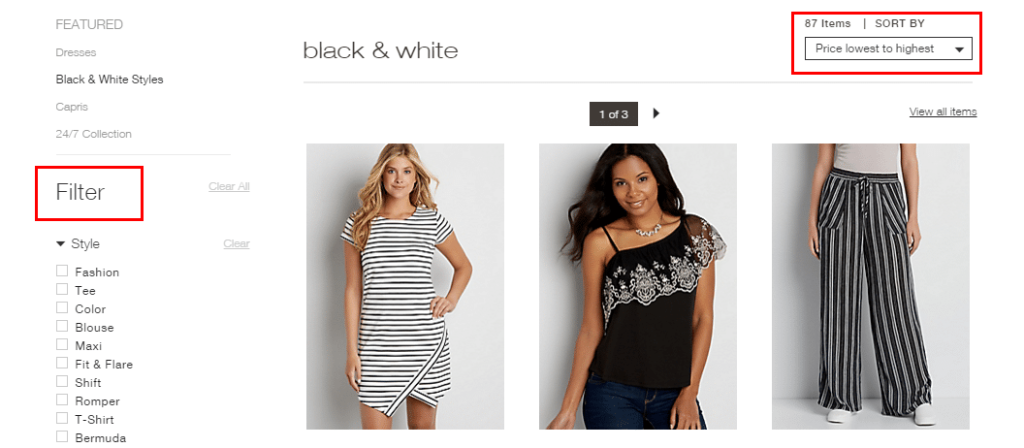
Filters and sorting
If you use a filter on the site, the results will be formed on a separate page with the dynamic URL. It means that the combination of different filters and sorting parameters creates numerous automatically generated pages. Such elements usually cause duplicate creation.
Pagination
Pagination also creates a duplicate issue as titles and descriptions of all the pages are the same. Read about how to do it correctly at the end of the article.

How Duplicates Affect Rankings
Wasting of a Crawl Budget
The crawl budget is the number of URLs Googlebot can crawl over a certain period. We know that the crawl budget has a limit. You can either just put up with it, or you can try to make it grow. One of the ways – is to delete or hide all the duplicate pages from your site and let the spider index important pages instead of unuseful duplicates.
Reducing of Visibility
Since search engines want to provide the most relevant information, they’re trying not to show the same pages as the result. So, the engine probably will choose one of your duplicates, and this way visibility of each of the duplicates can be lowered. For a deeper dive, explore our guide on Zero Search Volume Keywords.
Backlinks Division
If the same article is available on two different URLs, all backlinks and shares will be divided between these two articles as some readers are linking to the first URL and others ‒ to the second one. It means that the rankings of two pages will be lower. For a deeper dive, explore our guide on Creating SEO-Friendly URLs.
How to Identify Duplicate Content
Since we’ve found out how it affects the ranking, let’s identify all the duplicates on your site so you can fix or hide them from the search engine.
First of all, you can do it manually or you can use the tools. It depends on the size of your site and the number of such a page. Small issues can be fixed in a few minutes my hand but if you’re not sure, don’t waste your time and use special instruments.
Manually
So, if your website is quite small, you can do the following operation to find the duplicates.
Use site:yourwebsite.com to get the list of all your site pages indexed by Google.
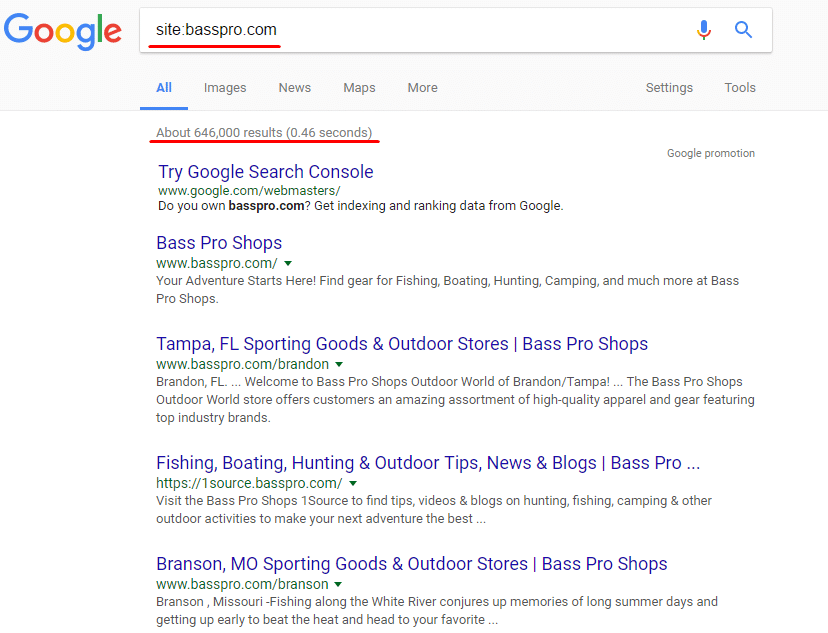
After that, you can manually check the results. And again, it’s no sense to use this approach with huge platforms. It better fits when your site is already optimized so you can just take a look on your main pages to find out if some duplicate issues appeared lately.
Also, you can check certain pages for duplicates using the following operator: site:mysite.com intitle:the title you’re checking.
And be sure to click “repeat the search with the omitted results included” at the bottom of SERP. Without it, Google will show you only unique pages.
Google Search Console
Go to the Search Appearance section and click on HTML Improvements. There you can find Duplicate meta descriptions and Duplicate Title tags.
Here is what it looks like:

But, unfortunately, it’s the only type console can show. So, this method can help only to check if duplicates exist on your site, but it isn’t suitable for deep investigation.
Serpstat Site Audit
Serpstat is an All-in-one SEO platform with 5 modules:
Keyword Research
Competitive Analysis
Backlink Analysis
Rank Tracking
and Site Audit
Create a project and set the needed audit parameters. There you’ll see a list of errors divided both by the error type and level of priority. Go to the Meta tags section of the Audit module to see the list of pages that have an identical title or description tags.
Here’s what it looks like:

And you can also see the detailed report to see which pages breed duplicates:

Serpstat is one of the best options because it’s a cloud-based platform, which means you can access the audit results from any place and you don’t have to run anything on your computer. Plus it shows all of the SEO errors on your website, not just duplicate issues.
How to Fix the Duplicate Content Problem
To ‘fix’ the duplicate content problem can mean three ways:
- to remove unnecessary ones
- to hide such pages from the search engine
- to point to the main pages
Here are the most common methods to do it:
- set 301 redirect
It refers to the small differences like www and non-www versions or HTTP and HTTPS, with and without “/” at the end, etc.
You can show the search engines which page is the main setting 301 redirects from the duplicate page to the original one. This way these pages won’t be considered duplicate content because the robot will always be redirected to the main page. Doing this simple trick can help you massively, even if you are in local markets like Mental Health Marketing.
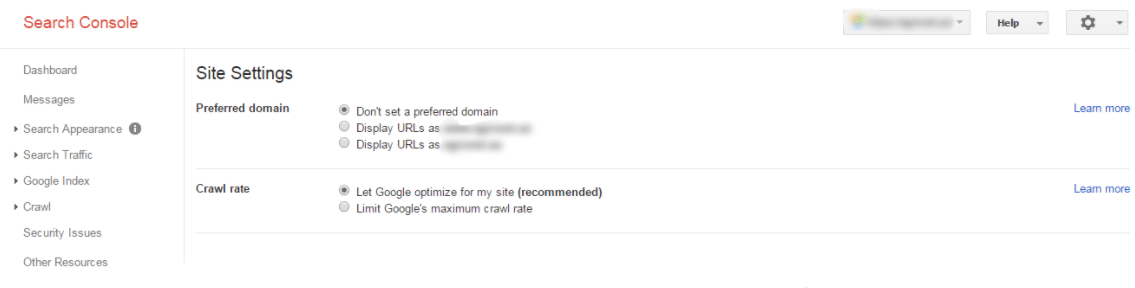
The alternative to this method is to choose the preferred domain at Google Webmaster Tools: with or without www. But, you should remember that everything you set in the Google Webmaster tool works only for Google.
- use rel “canonical” tag
It can be useful when you deal with sorting and filtering pages. You can’t just remove them, but the robot considers all these pages as duplicates. And since, for example, an online clothing store usually has hundreds of different kinds of dresses, imagine the amount of wasted crawl budget on these pages.
To avoid such a problem, use the rel “canonical” tag. Thus when the crawler visits these pages, it understands that the category page is preferred and there is no use in indexing the other hundred pages.
Here is what it looks like:
<link rel=”canonical” href=”https://blog.example.com/dresses/green-dresses/” />
to the page
https://blog.example.com/dresses/green-dresses/?sort_min_price
- use meta robots
It fits the pages you don’t need to be indexed by the robot (for example, the basket page, printer-friendly pages e.g.). It allows search engines to crawl a particular page but not index it.
Here is what it looks like:
<meta name=”robots” content=”noindex, follow”>
You also can use the tool SeoHide to forbid the robot to index such pages.
- Set rel=”prev” and rel=”next” tags for pagination
Use rel=”prev” and rel=”next” tags to help Google understand that this is not a duplicate but a pagination. Tag rel=”prev” stands for the previous page, while rel=”next” for the next one.
Here is what it should look like:
At <head> http://site.ru/category/
<link href=”http://site.ru/category/2/”>
At <head> http://site.ru/category/2/
<link href=”http://site.ru/category/”>
<link href=”http://site.ru/category/3/”>
Final Thoughts
So, duplicate content can be the major SEO ranking factor, so this issue is definitely worth your attention. You probably can’t see the decline significantly, but it can be a good explanation for the stuck in the same position or you’re slowly dropping.
In this article, I covered the basics of the duplicate content issue. There are much more reasons, consequences, and ways to fix it. But I hope I managed to show you how important this problem is so you can check and improve your site using my recommendations.
Check out other interesting reads from our blog here:
Frequently Asked Questions
Q: What is this guide about?
This comprehensive guide provides strategies and best practices for achieving success. Following these approaches can help improve your results and competitive advantage.
Q: How long does it take to see results?
Results vary. Most strategies require 3-6 months before significant improvements. Ongoing optimization and consistency are essential for sustainable success. For a deeper dive, explore our guide on SEO Optimization WordPress Must.
Q: Do I need professional help?
While basic implementation can be done independently, professional guidance often accelerates results and helps avoid costly mistakes.
Q: What are the most important factors for success?
Key factors include thorough research, consistent execution, quality over quantity, regular performance monitoring, and adapting to industry changes.
Q: How do I measure success?
Track KPIs like traffic, conversions, revenue, and engagement rates. Regular analysis helps identify areas for improvement.
Q: What channels should I focus on?
Most businesses benefit from SEO, content marketing, social media, and paid advertising. Start where your target audience is most active.
The Evolution of Digital Marketing Strategy
Digital marketing has transformed dramatically over the past decade, evolving from simple banner advertisements to sophisticated, data-driven strategies that leverage artificial intelligence and machine learning.
Modern digital marketing requires integrated approaches combining multiple channels into cohesive customer experiences.
Content Marketing Best Practices
Content remains the foundation of successful digital marketing, serving as the primary mechanism for attracting organic traffic, building brand authority, and engaging target audiences. For a deeper dive, explore our guide on Boost Organic Website Traffic.
Data-Driven Marketing Decisions
Modern marketing success depends on sophisticated analytics enabling data-driven decisions.
Building Brand Authority
Establishing thought leadership provides significant competitive advantages including increased brand awareness and customer trust.
Maximizing Marketing ROI
Proving marketing ROI requires clear objectives, sophisticated tracking, and continuous optimization.
Learn More: Home
Technical SEO in 2025: The Foundation That Determines Your Ceiling
Technical SEO is the least glamorous discipline in the search marketing stack — and the most consequential. You can have the best content, the most authoritative backlinks, and the strongest brand signals in your niche, but if Googlebot can’t efficiently crawl and index your site, or if your Core Web Vitals scores are in the bottom quartile, those assets are being systematically undervalued.
The technical SEO landscape in 2025 has expanded significantly. Where technical SEO once meant XML sitemaps and robots.txt management, it now encompasses JavaScript rendering, Core Web Vitals, structured data, site architecture, and increasingly, AI-readiness signals like entity markup and knowledge graph integration.
Core Web Vitals: The Performance Metrics That Directly Impact Rankings
Google’s Core Web Vitals became an official ranking signal in 2021 and have been progressively weighted more heavily since. The three metrics and what they actually measure:
- Largest Contentful Paint (LCP): How quickly does the main content of a page load? Target: under 2.5 seconds. The most common LCP killers are unoptimized hero images, render-blocking JavaScript, and slow server response times. Fix priority: compress and convert images to WebP, implement lazy loading for below-fold images, and enable browser caching.
- Interaction to Next Paint (INP): How quickly does the page respond to user interactions (clicks, taps, keyboard input)? This replaced First Input Delay in March 2024. Target: under 200ms. INP problems are almost always JavaScript-related — heavy third-party scripts, main thread blocking, or inefficient event handlers.
- Cumulative Layout Shift (CLS): How much does the page layout shift as it loads? Target: under 0.1. Common causes are images without defined dimensions, dynamically injected content (ads, banners, cookie notices), and web fonts loading after text is rendered.
Google’s PageSpeed Insights provides field data (real user measurements from Chrome users) that is the actual data used in rankings — not the lab data from manual tests. Optimize for field data improvement, not just lab score improvement.
Crawl Budget Optimization
Crawl budget — how many pages Googlebot crawls on your site per day — is finite and valuable. Wasting it on low-value pages means high-value pages get crawled less frequently. Crawl budget optimization is critical for sites with 10,000+ pages.
Pages that consume crawl budget without adding value:
- Faceted navigation duplicates (color/size/price filters creating unique URLs)
- Paginated archives beyond page 2-3
- Tag and author archive pages on CMS platforms
- Session ID URLs and UTM parameter variations
- Staging or development URLs accidentally accessible to crawlers
Management approach: use robots.txt to block parameter-based duplication, implement canonical tags on near-duplicate pages, and configure the URL Parameter tool in Google Search Console to indicate which parameters change page content versus just tracking parameters.
JavaScript SEO: The Invisible Technical Barrier
Over 70% of websites now use JavaScript frameworks (React, Vue, Angular, Next.js) for their front-end. JavaScript SEO is the discipline of ensuring these frameworks don’t create rendering barriers for Googlebot.
Googlebot renders JavaScript, but with significant caveats: rendering happens in a second-wave queue (hours to days after initial crawl), JavaScript errors can prevent content from rendering entirely, and complex client-side routing can prevent proper canonicalization.
The safest architecture for SEO: Server-Side Rendering (SSR) or Static Site Generation (SSG) for all content that needs to rank. Dynamic content (personalization, user-specific data) can be client-side. This hybrid approach gives you the performance and SEO benefits of server rendering without sacrificing the interactivity of modern JavaScript frameworks.
Frequently Asked Questions
What are the most important technical SEO factors in 2024?
Critical technical SEO factors: Core Web Vitals (LCP under 2.5s, INP under 200ms, CLS under 0.1 — direct Google ranking signals), mobile-first optimization (Google indexes the mobile version of your site first), HTTPS security (required for trust and ranking), crawlability (Googlebot must access all important pages — check robots.txt and Search Console coverage report), internal linking structure (link equity distribution and crawl path optimization), canonical tags (preventing duplicate content penalties from URL variations), XML sitemap accuracy (lists only indexable, canonical URLs), and structured data markup (schema enhances rich results and AI citation eligibility).
How do I conduct a technical SEO audit?
Technical SEO audit in 5 phases: (1) Crawl analysis — use Screaming Frog (free up to 500 URLs) to identify broken links, redirect chains, missing meta tags, duplicate titles/descriptions, and thin pages; (2) Google Search Console review — check Coverage report for excluded/errored pages, Core Web Vitals report, Mobile Usability issues, and any Manual Actions; (3) Page speed analysis — run PageSpeed Insights on top 10 pages; focus on mobile score; (4) Structural review — check site architecture depth, internal linking, and URL structure consistency; (5) Structured data validation — test key pages with Google’s Rich Results Test. Prioritize fixes by: crawlability issues first, then speed, then structured data, then optimization refinements.
What causes a website to have duplicate content issues?
Duplicate content sources: (1) www vs. non-www URL variations without proper redirect/canonical (www.site.com vs. site.com both serving content); (2) HTTP vs. HTTPS versions both accessible; (3) URL parameters creating multiple URLs for same content (pagination, filters, session IDs, tracking parameters); (4) Pagination without rel=canonical or rel=prev/next implementation; (5) Printer-friendly page versions; (6) Scrapers copying your content (external duplicates); (7) CMS-generated multiple URL paths to the same content; (8) Thin boilerplate content repeated across location pages. Fix with: 301 redirects for www/HTTP versions, canonical tags for parameter URLs, and noindex for truly duplicate pages.
How does page speed affect search rankings and conversions?
Google confirmed page speed as a ranking factor in 2010 and elevated it through Core Web Vitals as ranking signals in 2021. The conversion impact is even more significant than ranking: a 1-second delay in page load reduces conversions by 7% (Google research); 53% of mobile users abandon sites taking over 3 seconds to load; Amazon estimated 100ms of latency costs 1% of sales. For e-commerce, every 1-second speed improvement typically drives 2–5% conversion rate improvement. Combined SEO + conversion impact means page speed investment has among the highest ROI of any technical optimization — often 10–30x return on optimization investment.
What are the best tools for monitoring website technical health?
Technical SEO monitoring stack: Google Search Console (free, the most authoritative data source — coverage, speed, usability, enhancements), Google PageSpeed Insights (free, Core Web Vitals field data + lab test), Screaming Frog SEO Spider (free for 500 URLs, paid for larger sites — comprehensive crawl analysis), Ahrefs or Semrush Site Audit (automated technical issue detection with priority scoring), Cloudflare Analytics (performance + security monitoring), and UptimeRobot (free uptime monitoring with email/SMS alerts for downtime). Run automated crawls monthly and Search Console review weekly — most technical issues degrade gradually rather than appearing suddenly.
Sources & Research
- According to Google Search Central, duplicate content is not a penalty trigger, but it forces Google to choose a canonical version, potentially diluting ranking signals.
- SEMrush’s Site Audit data (2025) found that 50% of websites have duplicate content issues, making it one of the most common technical SEO problems.
- Research from Moz shows that 25-30% of all web content is duplicated across different URLs, impacting crawl efficiency.
- John Mueller (Google, 2024) confirmed that canonical tags remain the recommended solution for handling unavoidable duplicate content.
- A Screaming Frog study (2025) found that resolving duplicate content issues improves crawl efficiency by an average of 35%, leading to faster indexing.

Top 10 Best GEO Optimization Agencies in the World (2026)
Top 10 Best GEO Optimization Agencies in the World (2026) Key Takeaways: The global GEO…
Read More →
Site Architecture for SEO: How to Structure Your Website for Maximum Rankings
The complete guide to site architecture SEO structure. Covers crawl budget optimization, internal linking strategy,…
Read More →
AI Search Optimization vs Traditional SEO: Why the Smartest Brands Do Both (2026)
AI search optimization and traditional SEO are not competing strategies -- they are complementary systems.…
Read More →
Generative Engine Optimization (GEO) Services: The Complete Enterprise Guide (2026)
Enterprise GEO services that get your brand cited in ChatGPT, Gemini, and Perplexity. OTT builds…
Read More →
ChatGPT Visibility & AI Citation Optimization: How to Get Your Brand Cited by AI in 2026
AI citation optimization gets your brand inside the answers ChatGPT, Gemini, and Perplexity generate. OTT…
Read More →-
 By Guy Sheetrit
- Mar 17, 2018
 By Guy Sheetrit